

Wrong survey number or the wrong Sub-Registrar Office can delay your TN EC by weeks. Below is exactly where to click on TNREGINET, what to fill in, and how to fix the errors that trip most applicants.
What Is a TN EC (Encumbrance Certificate)?
A TN EC (Encumbrance Certificate, called வில்லங்கச் சான்று or Villangam Certificate in Tamil) is an official record from the Tamil Nadu Registration Department listing every registered transaction on a property for a chosen period sales, mortgages, gift deeds. “Nil” means no registered dues exist.
An Encumbrance Certificate (EC) is essentially a transaction history for a property. It lists every registered event tied to that specific piece of land or building over a time period you specify typically 10, 15, or 30 years.
Think of it as the property’s legal diary. The certificate captures:
- Mortgage agreements and loan settlements
- Sale deeds and ownership transfers
- Lease and rental registrations
- Gift deeds and inheritance records
- Court orders or legal claims registered against the title
When no transactions appear for the requested period, you get what’s called a Nil Encumbrance Certificate.
This simply means no registered liabilities exist for that timeframe—a green flag for buyers and lenders alike.
One thing to understand: the EC only captures registered transactions.
Unregistered agreements, private family arrangements, or verbal understandings won’t appear.
That’s why it works alongside other documents like the patta and title deed, not as a standalone guarantee.
Encumbrance Meaning in Tamil (வில்லங்கம்)
In Tamil, an encumbrance is called வில்லங்கம் (villangam) a registered claim, loan, mortgage or dispute attached to a property. That is why the Encumbrance Certificate is known as வில்லங்கச் சான்று (Villangam Sandru) or Villangam Certificate: a record showing whether any such registered claim exists on the property.
Why You Can’t Skip the TN Registration EC
Skipping the EC is like buying a used car without checking if it has outstanding loans against it. Here’s why it matters across different situations:
For Buyers: The encumbrance certificate tn gives you a paper trail of ownership. It tells you whether the seller actually has the right to sell,
and whether any previous owners had taken loans using this property as collateral that haven’t been repaid.
For Loan Applicants: Banks in Tamil Nadu require an EC as non-negotiable documentation.
Without it, your home loan application won’t even reach the verification stage.
Lenders want proof that the asset you’re offering as security isn’t already pledged elsewhere.
For Dispute Prevention: A clear EC won’t prevent someone from filing a false claim against your property, but it gives you a strong evidentiary foundation if a dispute ever reaches court.
The registration record is public—anyone can check it—so it creates transparency that discourages fraudulent claims.
For Municipal Approvals: Building permits, property tax reassessments, and even some utility connections require an EC.
It’s become a standard prerequisite across government departments.
You may also like to read these posts : 👇
Encumbrance Certificate Telangana – Complete Guide
Encumbrance Certificate AP: Why It Matters and How to Get Yours Online
Encumbrance Certificate Karnataka: Your Complete Guide to EC Online Karnataka
Encumbrance Certificate – Meaning in Regional Languages
How to Apply for TN EC Online on TNREGINET
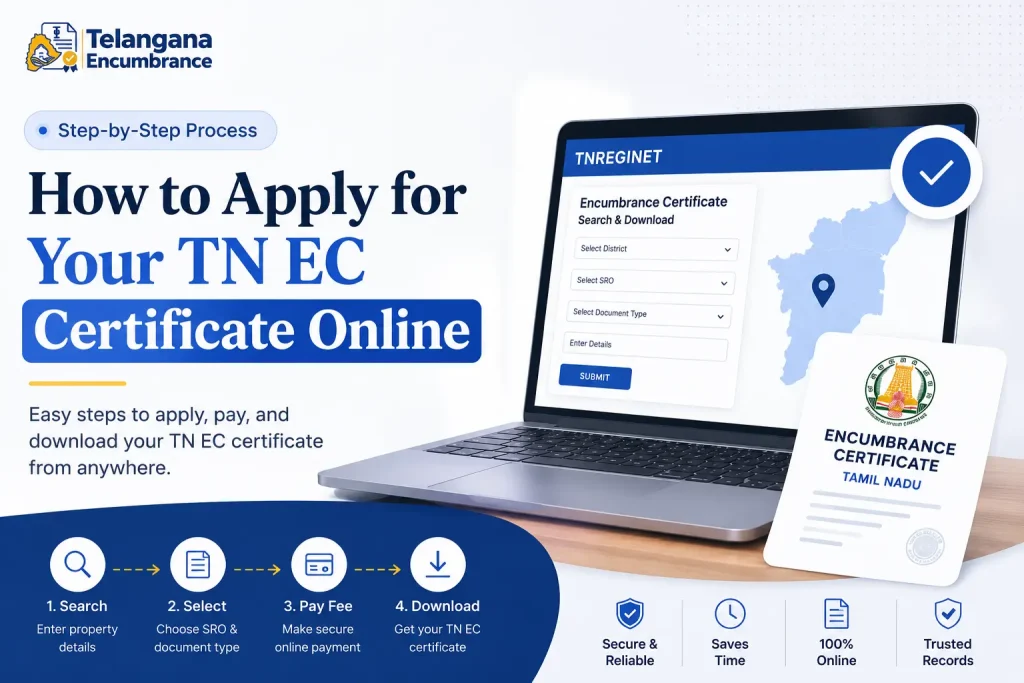
The Inspector General of Registration (IGR) Tamil Nadu operates the TNREGINET portal, the official gateway for all tn ec certificate online applications. Here’s the actual process.
To get a TN EC online, log in to tnreginet.gov.in, go to E-Services and choose Encumbrance Certificate, then select zone, district, Sub-Registrar Office and village. Search by survey number or document number and date range. Viewing is free; a digitally signed PDF with QR code needs a small fee.
What You’ll Need Before You Start
Gather these details first. Applicants who start without them often get stuck midway:
- Location identifiers: District, zone, and the specific Sub-Registrar Office (SRO) where your property falls. If you’re unsure which SRO covers your area, check your previous sale deed—it’s mentioned there.
- Property identifiers: Survey number, subdivision number, and village name. Patta number can also work for some search types.
- Your contact details: A working mobile number and email address. The portal sends OTPs and status updates here.
- ID proof: Aadhaar, Voter ID, or PAN card details for verification.
Step-by-Step Application Process
1. Go to the TNREGINET portal
Open your browser and visit tnreginet.gov.in. Use a desktop or laptop if possible—the mobile experience can be clunky for complex searches.
2. Create your account or log in
First-time users need to click “User Registration” and fill in basic details. The system sends an OTP to your mobile—enter it to activate your account. Returning users can simply log in with their credentials.
3. Find the EC service
Once logged in, locate the “E-Services” tab at the top. From the dropdown, select “Encumbrance Certificate,” then choose “Search and Apply for EC.” This takes you to the actual application form.
4. Enter property location details
This is where many applicants go wrong. You’ll need to select:
- Zone (typically Chennai, Coimbatore, Madurai, or others)
- District
- Sub-Registrar Office
- Village
If your village doesn’t appear in the dropdown, double-check your SRO—you might have selected the wrong office.
5. Choose your search type and enter details
You have two search options:
- EC Search (Survey-based): Enter your survey number, subdivision number, and the date range you need. For example, if you want the past 15 years, enter dates accordingly. The portal’s date picker can be finicky—type the dates manually if it doesn’t respond.
- Document-wise Search: If survey-based search yields nothing (this happens when survey numbers have been updated or merged), use this option. Enter the registered document number and year from a previous deed. This often works when other methods fail.
6. Review, apply, and pay
After clicking “Search,” the system shows you available transactions. If everything looks correct, proceed to application.
Fill in your personal details and move to payment. There’s a distinction here: viewing the EC is free, but getting a digitally signed official copy with a QR code involves a small fee.
You’ll see the exact amount on the payment screen before you confirm.
7. Save the acknowledgment
Once payment goes through, download the acknowledgment receipt immediately.
The bank reference number and transaction ID on this receipt are your only way to track
the application if something goes wrong. Save it somewhere you can find later.
A common pitfall: Many applicants assume the EC generates instantly after payment. It doesn’t. The sub-registrar’s office processes the application manually on their side, which takes time. You’ll get the certificate only after their approval.
How to Download TN EC PDF from TNREGINET
Once the sub-registrar’s office approves your application, the digitally signed tn ec certificate becomes available online. Here’s how to retrieve it:
1. Log back into TNREGINET
Use your credentials to access your account dashboard.
2. Navigate to EC View
Go to E-Services > Encumbrance Certificate > “View EC” or “EC View Online.” Menu names can change slightly, so if you don’t see it, check the portal’s search or help section.
3. Enter your search parameters
Select your search type (EC or Document-wise) and enter the district, SRO, and date range or document number you applied with. The system needs these to locate your specific file.
4. Download the certificate
Click “Search,” and your EC will appear as a downloadable PDF. The certificate includes a QR code—scan it to verify authenticity.
If the QR code doesn’t work, the certificate is likely still pending approval, or there’s a technical issue.
What to do if it’s not there:
EC Shows “No Data Found”? Fix It
Recheck zone, district, Sub-Registrar Office, village and survey number.
Widen the date range.
Try document-wise search. The SRO sometimes uploads the certificate under a slightly different document number, so also try your application reference number.
If you applied recently, the SRO may not have approved it yet. Keep your acknowledgment receipt for a follow-up.
Documents You’ll Typically Need
For both online application and offline verification, keep these ready:
- ID proof: Aadhaar, PAN card, or Voter ID. The name should match the one you used on the application.
- Property title deed or sale deed: A copy showing survey details and the previous registered document number.
- Survey details: Survey number, subdivision, and plot number as they appear in government records. These can sometimes differ from what’s written in your deed—verify at the taluk office if you’re unsure.
- Power of Attorney: Only if you’re applying on someone else’s behalf. The POA document needs to be registered and should explicitly authorize EC application.
Mistakes That Derail TN EC Online Applications
Based on common experiences, here are the errors that cause delays or rejections:
1. Typing the survey number wrong
Even a single digit off can return no results. Cross-check with your sale deed and, if possible, with the taluk office records. Survey numbers sometimes change during land settlement operations.
2. Selecting the wrong Sub-Registrar Office
Properties on the boundary of two SROs are tricky. The correct office is the one where the property was last registered,
not necessarily the one closest to your location. Check your previous deed—it clearly mentions the SRO.
3. Choosing the wrong date range
If you request a 10-year EC but the property was last registered 12 years ago, the system might still show results. But if you request a 30-year history,
expect more entries—and more verification time. Banks typically ask for 15 years, but check with your lender.
4. Ignoring the document-wise option
When survey-based search fails, many applicants give up. Switch to document-wise search using the registered document number from your latest deed. This often bypasses the issue entirely.
You may also like to read these posts : 👇
Encumbrance Certificate in Bangalore: Your Step-by-Step Guide to a Safe Property Deal
Encumbrance Certificate Kerala: How to Apply Online, Check Status & Download EC
IGRS TN vs TNREGINET: Are They the Same?
IGRS TN usually refers to the Inspector General of Registration, Tamil Nadu, the department that runs the TNREGINET portal. For EC search, view and download, use tnreginet.gov.in directly and avoid look-alike sites.
Frequently Asked Questions
1. What does TN EC stand for?
TN EC stands for Tamil Nadu Encumbrance Certificate. It is an official record from the Tamil Nadu Registration Department that lists registered transactions on a property, such as sales, mortgages, leases and gift deeds, for a period you choose. Buyers and banks use it to confirm there are no registered liabilities.
2. What is the meaning of encumbrance in Tamil?
In Tamil, encumbrance is வில்லங்கம் (villangam), a registered claim, loan or liability attached to a property. That is why the EC is called வில்லங்கச் சான்று (Villangam Sandru) or Villangam Certificate .
3. How long is an Encumbrance Certificate valid?
An EC doesn’t have an expiry date as such it’s a snapshot of history up to the issue date. However, banks and government offices typically expect an EC issued within the last 3-6 months.
The reasoning is practical: encumbrances registered yesterday won’t appear on a certificate from six months ago.
4. Can I view the TN registration EC online for free?
Yes, viewing the certificate on the TNREGINET portal is free. You only pay when you need a digitally signed copy for official purposes.
That copy includes a QR code that authorities can scan to verify it’s genuine.
5. How long does the TN EC certificate online take to process?
It varies by sub-registrar office and workload. The typical range is 5 to 15 working days. Some offices process faster, others take longer.
If you’re in a hurry, there’s no official expedited option applying well in advance is your best strategy.
6. What does a “Nil Encumbrance Certificate” mean?
It means no registered transactions exist for that property during the time period you requested. Banks often require this to approve loans.
But remember: “Nil” only covers registered transactions. Unregistered claims or disputes wouldn’t appear.
7. Do I need an EC for all property types in Tamil Nadu?
Yes, for any immovable property residential houses, vacant land, agricultural plots, commercial buildings, flats.
The EC requirement applies regardless of property type whenever there’s a transaction or loan involved.
8. Can someone else apply for the EC on my behalf?
A representative can apply if they hold a valid Power of Attorney specifically authorizing them to handle registration-related matters.
The POA must be registered and submitted during the application process. A general POA without explicit mention of EC applications may not be accepted.
9. Are IGRS TN and TNREGINET the same?
IGRS TN usually refers to the Inspector General of Registration, Tamil Nadu, the department that runs the TNREGINET portal. For EC search, view and download, use tnreginet.gov.in directly and avoid look-alike sites.
10. TNREGINET shows “No Data Found”. What should I do?
Recheck zone, district, Sub-Registrar Office, village and survey number, then widen the date range. If it is still empty, switch to document-wise search using the registered document number and year from your latest deed. If you applied recently, the SRO may not have approved and uploaded the EC yet.
Final Checklist Before You Apply for TN EC
- Confirm your survey number and sub-division from your latest sale deed.
- Confirm the SRO where the property was last registered.
- Choose a date range your bank accepts. Banks commonly ask for 15 years, but confirm with your lender.
- Keep your document number and year ready for document-wise search.
- Save the acknowledgment receipt. If your file is stuck, visit the SRO with it.
A “Nil” EC is usually good news, but make sure the period covers the entire ownership history you care about.
Disclaimer: This guide is for general information only and is not legal advice. Portal menus and fees can change, so confirm on tnreginet.gov.in.

6 Comments
Pingback: Encumbrance Certificate Telangana | Complete Online Guide
Pingback: Encumbrance Certificate AP: Why It Matters | Online Guide
Pingback: Encumbrance Certificate Karnataka | Easy EC Online Guide
Pingback: Encumbrance Certificate - Meaning in Regional Languages | Easy Guide
Pingback: Encumbrance Certificate Kerala: Complete Online Guide | Apply, Check & Download
Pingback: Encumbrance Certificate in Bangalore | Easy Online Guide