

Your land purchase is three days away. The seller seems genuine, the price is agreed, and the bank has almost cleared your loan. Then someone asks for the EC and you realise you have no idea how to get one.
Or worse: you downloaded a certificate once,and the sub-registrar’s office rejected it because the search period was too short. Either way, you are now searching for a dharani ec search guide that actually explains how the process works.
This article covers what an Encumbrance Certificate shows, how the Dharani portal fits into Telangana’s land records system, the exact steps to pull an EC online, and the mistakes that cause most applications to bounce back.
What an Encumbrance Certificate Actually Tells You
An Encumbrance Certificate (EC) is a record issued by the registration department listing every transaction registered against a property during a period you choose. Think of it as the property’s paper trail not a title certificate, but a log of what has been formally recorded against that land or building.
A dharani ec typically captures sale deeds, gift deeds, mortgage deeds, release deeds, and legal claims registered with the Sub-Registrar’s Office. If nothing was registered in your chosen window, the certificate comes back marked “Nil Encumbrance” which is what buyers hope to see.
Why does this matter? Banks generally will not sanction a land or home loan without an EC. Buyers use it to confirm the seller actually owns what they claim and has not already pledged the property elsewhere. And it is one of the few ways to catch double-selling before you pay a token advance.
Where Dharani Fits in Telangana’s Land Records
The Dharani portal was built to consolidate Telangana’s agricultural land records Pahani details, Pattadar Passbooks, registration slot booking, and encumbrance searches into one login.
For years, this was the default route for a dharani encumbrance check on farm land. The dharani portal ec service cut out a lot of counter visits, which is why it became so widely used.
The landscape has since shifted. Bhu Bharati now handles several land record services, including EC checks for transactions that predate Dharani.
If you are unsure which platform applies to your property, open the official portal first rather than assuming. The rules differ for agricultural land versus registered urban plots.
You may also like to read these posts :👇
Bhu Bharathi Survey Number Map: View Telangana Village Maps Online
Pattadar Passbook Telangana: Download, Status & How to Apply Online
Pahani Telangana Online: How to Download Pahani via Bhu Bharathi
Maa Bhoomi, Bhumata & Webland Telangana: What Happened & Where to Check
Dharani EC Search Telangana: Step-by-Step
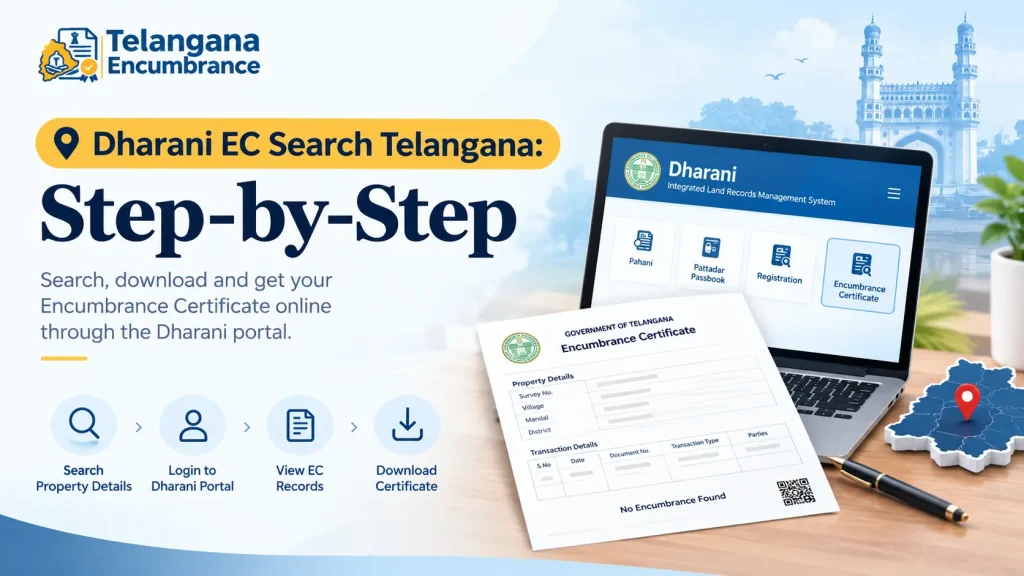
Here is the standard workflow. Portal layouts change from time to time, so treat field names as approximate and follow what you see on screen.
Step 1: Open the official portal
Go to the Dharani portal from a desktop browser if possible. The mobile interface sometimes hides the EC option under a collapsed menu, and the dropdowns for district and mandal are easier to use on a larger screen.
Step 2: Log in with your mobile number
You will need your mobile number and password. First-time users register with basic details and verify via OTP. Basic searches may work without logging in, but the moment you want a downloadable certificate, authentication kicks in.
Step 3: Find the EC section
Look for “Search EC Details” or similar wording on your dashboard. Do not confuse this with the Pahani or market value sections they sit close together and look alike.
Step 4: Enter the property details
You will be asked for district, mandal, village, survey number or subdivision, and the Khata or Pattadar Passbook number.
The pitfall that catches most people: village names repeat across mandals, and survey numbers get subdivided over generations. If your sale deed says “Survey No. 112/2” but the portal only lists “112,” you are likely looking at a parent survey number. Search the parent number and check the subdivision entries rather than assuming the record is missing.
Step 5: Choose your search period
The portal defaults to a short window. Do not accept it. For a purchase, extend the range to cover at least 15 years 30 if the land has changed hands within families. A short EC looks clean simply because it missed the older mortgage.
Step 6: Download and read it
Review the entries before you download. Once the PDF is saved, that is your working copy. Most banks and buyers accept this portal-generated version, though some institutions still insist on a certified copy from the Sub-Registrar’s Office confirm with whoever asked for it.
Reading the Entries Without Getting Lost
An EC is a table, and the columns matter more than the summary.
The property description shows survey number, extent, and boundaries. The transaction section lists the deed type sale, gift, mortgage, release along with executants (who transferred), claimants (who received), document number, and registration date.
Two entries deserve your attention. A mortgage entry means the property was pledged as collateral at some point. A release deed usually means that mortgage was later cleared but check the dates. A mortgage from 2011 with no matching release is a live question you need answered before payment, not after.
Common Mistakes That Delay or Invalidate Your EC
Wrong jurisdiction. Records sit with a specific Sub-Registrar Office. Pick the wrong district and you get either nothing or someone else’s land.
Too short a search window. A five-year EC can miss a 20-year-old mortgage that still legally binds the property.
Expecting unregistered deals to appear. The EC only shows what was formally registered. A family arrangement, an oral partition, or pending litigation will not show up here. For high-value purchases, an EC alone is not enough due diligence.
Documents and Details to Keep Ready
For an online search, you mainly need the property’s identifiers: survey or plot number, village and mandal names, and the Pattadar Passbook number for agricultural land. These appear on the sale deed, the passbook itself, or old property tax receipts.
If you are applying offline at the Sub-Registrar Office, you will commonly need a written application, identity proof such as Aadhaar, and copies of the property documents. Requirements vary by office, so call ahead or check the portal’s guidelines rather than making a wasted trip.
You may also like to read these posts :👇
How to Find Survey Number of Land in Telangana
Bhu Bharathi / Dharani Application Status: Track Mutation & Passbook
ధరణి పోర్టల్ తెలంగాణ: భూ భారతిగా మార్పు – పూర్తి వివరాలు
Old Pahani, Sethwar & Khasra Pahani (1954-55) Telangana: How to Get a Copy
FAQs
Can I run a Dharani EC search without logging in?
Basic lookups sometimes work as a guest, but downloading the certificate almost always requires mobile number and OTP authentication. Registration is one-time and unlocks other services too.
What is the difference between a Dharani EC and an IGRS EC?
Dharani is built around agricultural land records. IGRS, run by the Registration and Stamps Department, handles EC searches for properties registered with the Sub-Registrar’s Office, including urban plots and flats. Farm land usually goes through Dharani; city property usually goes through IGRS.
How far back do the records go?
Digitised records in Telangana generally stretch back to the early 1980s. Anything older may require a manual search at the Sub-Registrar Office, and Bhu Bharati has a separate service for pre-Dharani EC details.
Will a bank accept my downloaded EC?
Usually yes. Some lenders, however, want a certified copy from the Sub-Registrar’s Office for certain loan types. Ask your bank which format they need before you pay for a certified copy you did not require.
What if the EC shows a transaction I knew nothing about?
It may be an old mortgage, a joint development agreement, or a claim registered by a relative. Do not proceed on the seller’s verbal explanation alone have a lawyer read the entry and confirm what it means for the title.
If you are buying land, pull the EC before you pay the token advance, not after. It is the cheapest step in the whole transaction and the only one that can stop a bad deal cold. And if the portal throws an error you cannot resolve a survey number that will not match,
a village that will not load walk into the local Sub-Registrar Office with your document number. Counter staff can often locate in minutes what the portal cannot surface.

3 Comments
Pingback: Pattadar Passbook Telangana | Download & Status
Pingback: భూ భారతి పోర్టల్ తెలంగాణ | లాగిన్ & సేవలు
Pingback: ROR-1B & Adangal Telangana | 1B Download Guide