

You enter your survey number into the Bhu Bharathi portal, hit search, and get nothing. Or worse the record appears, but the Pattadar name is wrong, the extent is off by half an acre, or the subdivision number you have on paper doesn’t exist in the system.
This happens more often than people expect, and it usually isn’t because the land is unrecorded. It’s because the search was done with the wrong jurisdiction, the wrong format, or on the wrong portal altogether.
This guide walks through how to perform a Bhu Bharathi land details search correctly, what the results actually mean, and where the online record stops being enough.
Whether you’re a farmer cross-checking your own Pahani entry, a buyer verifying a seller’s claim before a deal, or helping a relative navigate the system from another city, the process is manageable if you know which fields matter and which mistakes kill the search.
What Is Bhu Bharathi and How Does It Relate to Dharani?
Bhu Bharathi is Telangana’s Integrated Land Records Management System, built to replace the Dharani portal. Dharani launched in 2020 as the state’s single-window platform for agricultural land records, registration, and mutation services, and it digitised a huge volume of land data for the first time at scale.
The problem was what came after. Dharani drew sustained criticism over data errors, the difficulty of getting corrections approved, and a module structure that confused even revenue officials. Bhu Bharathi was introduced under the Telangana Bhu Bharati (Record of Rights in Land) Act, 2025,
to address those gaps. The new system restores a more detailed Pahani format, links land parcels to maps, and simplifies how corrections are requested.
In practice, this means legacy records from the Dharani era (2020–2025) are still viewable, but new services and updated records now flow through Bhu Bharathi. If you need current Telangana land details, start there not on Dharani.
Understanding Telangana Land Survey Numbers
A survey number is the unique identifier the revenue department assigns to a parcel of land. In rural and agricultural areas, it’s usually a plain number like 78 or 234/1. In urban or semi-urban layouts, it often appears as a subdivision 123/A, or 45/B/1.
That number is the key to almost every land details search in Telangana. Enter it correctly, along with the right district, mandal, and village, and the system pulls up ownership details, extent, classification, and sometimes encumbrance information. Enter it wrong, and you get a blank page that tells you nothing about whether the land is recorded or not.
One thing worth knowing early: survey numbers change. A resurvey, a consolidation exercise, or a village boundary revision can renumber parcels. If your documents are old, the number on paper may not be the number in the system.
You may also like to read these posts :👇
Bhu Bharathi Portal Telangana 2026:
Dharani Portal Telangana: Is It Closed?
How to Find Survey Number of Land in Telangana
Bhu Bharathi / Dharani Application Status: Track Mutation & Passbook
How to Check Land Details in Telangana by Survey Number
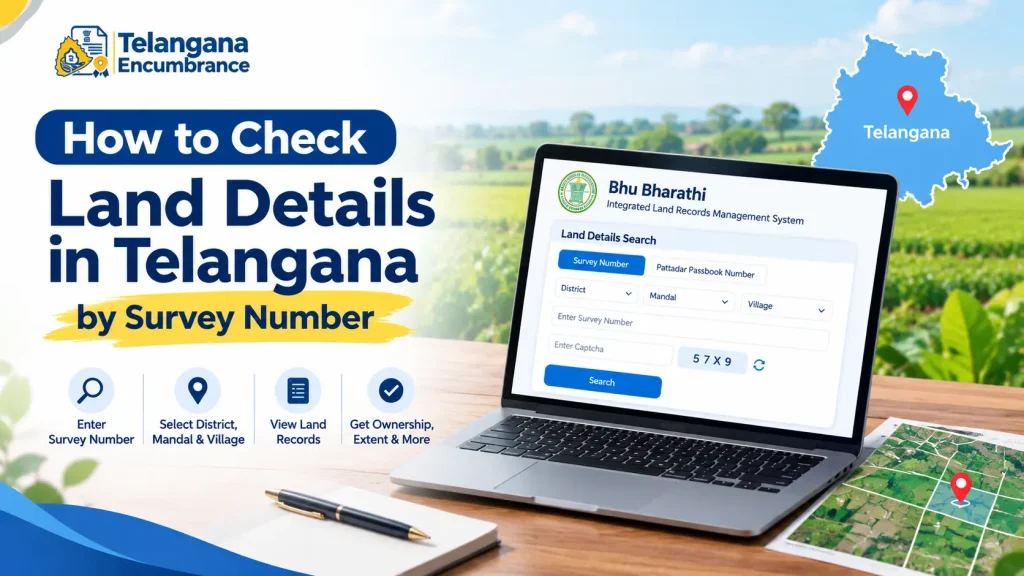
Here’s the sequence, based on how the Bhu Bharathi portal is structured.
Step 1: Open the Bhu Bharathi portal. Go to the official Bhu Bharathi website. Citizen services are grouped under an information services section on the homepage.
Step 2: Select the land record search option. Look for “Land Record Details” or “Know Land Status.” That link opens the search interface.
Step 3: Choose your search method. The portal usually lets you search by survey number or by Pattadar Passbook number. Pick survey number.
Step 4: Enter location details. Select district, mandal, and village from the dropdowns. These must match the revenue jurisdiction where the land sits not the postal address, not the municipal ward.
Step 5: Enter the survey number and khata number. Type the survey number exactly as it appears on your land documents. Some versions of the portal also ask for a khata number, the revenue account number tied to the holding.
Step 6: Complete the captcha and fetch details. Enter the captcha and click fetch or submit. If the details match, the record loads.
Step 7: Review the displayed information. You’ll typically see the Pattadar name, land extent, classification, and related record details, with options to view maps or transaction information in some cases.
Two pitfalls that trip up most people:
The first is jurisdiction mismatch. Telangana reorganised its districts in 2016, splitting old districts into new ones. If a property was registered under an old district name, searching under the current jurisdiction can return nothing. Try the old name if the new one fails.
The second is subdivision formatting. A number written as 45/B/1 on your deed might be stored as 45B1 or 45/B1 in the database. If your first attempt returns no results, try alternate formats before assuming the record doesn’t exist.
What Details Can You See in a Bhu Bharathi Land Record?
A successful search typically surfaces the following. Exact fields vary by land type and how recently the record was updated.
- Pattadar name the person recorded as landholder in government records
- Land extent measured area, usually in acres, guntas, or square yards
- Survey number and subdivision the parcel identifier
- Khata number the revenue account linked to the holding
- Land classification agricultural, non-agricultural, or another designation
- Village, mandal, and district administrative location
- Pattadar Passbook details passbook number and issue information
- Mutation history previous ownership transfers, where visible
Common Mistakes and Limitations to Watch For
A Bhu Bharathi search is a starting point, not a verdict. Several issues routinely cause confusion.
“No records found” doesn’t mean no record exists. A blank result can come from migration gaps, mutations that haven’t synced yet, or plain data entry errors. It does not automatically mean the land is unrecorded or disputed.
Online records aren’t certified copies. What you see on screen is for reference. For legal or registration purposes, you’ll typically need a certified copy obtained through the proper channel.
A clean record isn’t complete due diligence. The portal shows revenue entries, not the full legal picture. Pending litigation, unregistered family settlements, boundary disputes,
and forged documents may not appear at all. A careful buyer generally verifies the chain of title, runs a separate encumbrance certificate search, and confirms physical possession before proceeding.
Dharani-era errors may still be present. If a record was entered incorrectly between 2020 and 2025 and never corrected, it may carry over into Bhu Bharathi. Corrections are possible but usually require supporting documents and a visit to the revenue office.
You may also like to read these posts :👇
ధరణి పోర్టల్ తెలంగాణ: భూ భారతిగా మార్పు – పూర్తి వివరాలు
AP Field Measurement Book (FMB) & Land Parcel Sketch
AP Land Records Portal – Bhulekh AP & Meebhoomi Guide
Old Pahani, Sethwar & Khasra Pahani (1954-55) Telangana: How to Get a Copy
Frequently Asked Questions
Can I check Telangana land records by survey number for free?
Basic viewing on the Bhu Bharathi portal is generally free. Certified copies through MeeSeva or the sub-registrar office may involve a fee check the official portal for current rates.
What’s the difference between Bhu Bharathi and IGRS Telangana?
Bhu Bharathi handles land records and revenue administration ownership entries, Pahani, mutations, and agricultural land details. IGRS Telangana handles property registration and encumbrance certificate searches. Different systems, complementary purposes.
Why does my survey number show no results?
Usual suspects: wrong district or mandal, a number renumbered after a resurvey, an unsynced mutation, or subdivision formatting differences. Try the Pattadar Passbook number instead, or confirm the current survey number at the local revenue office.
Is Dharani still working for Telangana land records?
Dharani remains accessible for viewing legacy records from 2020–2025, but new services and updated records have moved to Bhu Bharathi. For current land details, use Bhu Bharathi.
Can I search using the Pattadar Passbook number instead of survey number?
Yes. The portal typically supports both. If you have the passbook, that route is often faster.
Does a clean Bhu Bharathi record mean I can skip a lawyer before buying land?
No. A clean record only confirms the revenue entries appear in order. It doesn’t capture litigation, title defects, or other legal risks. Independent legal verification remains advisable before any purchase.
One last thing worth doing: if you’re checking a record ahead of a property transaction, don’t leave the search to the day of registration.
Mutations can take time to reflect, corrections take longer, and a discrepancy discovered on the morning of the deal is far harder to resolve than one found three weeks earlier.
Run the search early, download or print what you find, and if something doesn’t match, raise it with the local revenue office while you still have room to negotiate.

2 Comments
Pingback: Bhu Bharathi Portal Telangana 2026 | Login & Land Records
Pingback: How to Check Plot Details Online | Fast Guide