

You have found a property in Bangalore that checks every box the location is right, the price fits your budget, and the building looks well-maintained.
The seller is ready to sign, and your bank has given preliminary approval for the loan.
Then the bank’s legal team asks for one document that could delay everything if you are not prepared: the encumbrance certificate.
Without it, your loan won’t be disbursed, and your dream purchase could fall through.
For anyone navigating property transactions in Karnataka’s capital, understanding
how to get an encumbrance certificate Bangalore is not just a procedural formality —
it is your primary defence against buying a property with hidden debts or legal claims.
This guide covers what the certificate contains,exactly how to obtain it online,
what documents you need, and what to watch out for if something goes wrong.
What an Encumbrance Certificate Actually Tells You
An Encumbrance Certificate (EC) is a government-issued record that lists every registered transaction affecting a specific property during a chosen time period.
This includes outright sales, mortgages taken against the property, lease agreements exceeding a certain duration,
gift deeds, court attachments, and inheritance settlements registered with the sub-registrar’s office.
Think of it as a chronological diary of the property’s legal life — who owned it, who borrowed against it, and whether those borrowed amounts have been cleared.
It answers the essential question: Is this property legally unencumbered, or are there outstanding claims against it?
The sub-registrar issues the certificate in two formats:
- Form 15 — Issued when the search period reveals one or more registered transactions. This is often called an “EC with liabilities” because it documents existing encumbrances.
- Form 16 — Issued when no transactions are found during the search period. Commonly known as a “Nil EC,” this certificate confirms that the property appears free of registered claims for that specific timeframe.
For a property purchase in Bangalore, banks typically require an EC covering 13 to 30 years of history.
The BBMP also demands a recent EC when you apply for Khata transfer or property mutation.
A missing or incomplete EC can halt both your loan and the registration process.
Sellers who hesitate to provide this document — or who push for a transaction without one — should raise immediate concern.
How to Get an Encumbrance Certificate Online in Bangalore
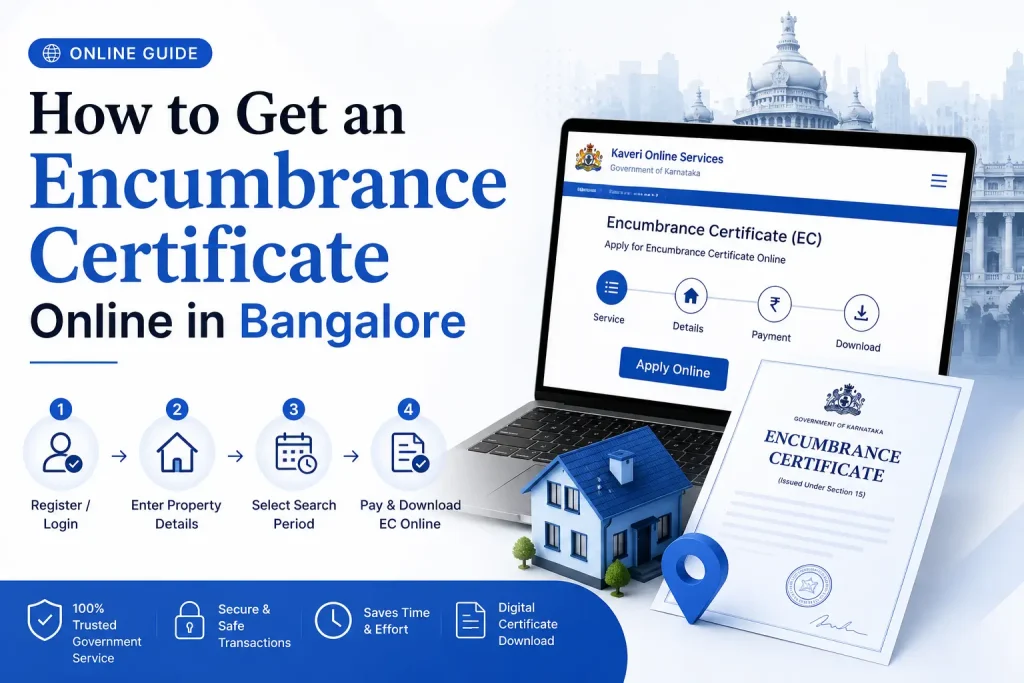
The Karnataka government’s Kaveri Online Services Portal has replaced the older, slower process of visiting sub-registrar offices.
You can now apply for and receive an encumbrance certificate bangalore online without leaving your home or office.
What many applicants do not realise, however, is that the online portal works best for transactions registered after April 1, 2004.
Properties with older transaction histories may require supplementary manual checks at the sub-registrar’s office. Keep this in mind before you begin.
You may also like to read these posts : 👇
Encumbrance Certificate Telangana – Complete Guide
Encumbrance Certificate AP: Why It Matters and How to Get Yours Online
Encumbrance Certificate Karnataka: Your Complete Guide to EC Online Karnataka
Encumbrance Certificate – Meaning in Regional Languages
Step-by-Step Application Process
Follow these steps carefully. A small error in the initial data entry — a single digit in the survey number, for instance — can pull up records for a completely different property.
- Visit the Official Portal
Go to the Kaveri Online Services website of the Government of Karnataka. Bookmark the correct URL to avoid lookalike third-party sites that charge extra fees. - Register or Log In
New users must create an account with a valid mobile number and email address. You will receive an OTP on your registered mobile for verification. Returning users can log in directly. - Navigate to the EC Section
From the service dashboard, select “Encumbrance Certificate” or “Online EC Services.” The portal’s menu structure changes periodically; if you cannot find the option, check under “Property Services” or use the site’s search function. - Start a Fresh Application
Click the option to apply for a new Encumbrance Certificate. Avoid using previously saved drafts unless you are absolutely certain the property details have not changed. - Enter Property Details Accurately — This Is Where Mistakes Happen
You will need to provide specific information:- Survey Number / Khata Number — The unique identifier for the property. Cross-check this with the sale deed or property tax receipt.
- District and Sub-District — Specify the jurisdiction where the property falls. Bangalore has multiple sub-registrar offices; selecting the wrong one returns no records.
- Property Description — Location, site number, apartment name, or street address.
- Owner’s Name — Enter exactly as it appears on registered documents.
- Document Numbers (if known) — The registered sale deed number can help narrow the search.
- Select the Search Period
Choose a start date and end date for the encumbrance search. For home loan applications, select a 13-year or 30-year window as required by your bank. If you are uncertain about the property’s full history, request a longer period rather than a shorter one — you cannot run the search again without paying fresh fees. - Choose Preview or Certified Copy
- Free Preview — Generates an uncertified digital copy instantly. Useful for a quick check, but it holds no legal validity.
- Digitally Signed EC — The certified version that banks and registration offices accept. This option involves a fee and takes additional processing time.
- Pay the Applicable Fees
The processing fee depends on the number of years you are searching. As a general range, it may fall between ₹25 and ₹200, but check the Kaveri portal for current rates before payment. You can pay through UPI, net banking, credit cards, or debit cards. Save the payment receipt for your records. - Submit and Track Your Application
After payment, the system generates an acknowledgement receipt with a transaction reference number. Note this number down. The digitally signed certificate is typically processed within a few working days. You will receive a notification on your registered mobile and email when it is ready. Log back into the portal to download the final certificate.
A word of caution: third-party websites and agents often promise faster delivery of an encumbrance certificate bangalore one or “instant EC” for an extra fee.
The only certificate that holds legal value for bank loans and property registration is the one issued directly through
the Kaveri portal or the sub-registrar’s office. Treat any alternative with healthy scepticism.
Documents and Information You Will Need
Before opening the Kaveri portal, gather these items to avoid interruptions:
- Property tax receipt or latest assessment order — Helps confirm the exact survey number and property description.
- Sale deed or title deed — Useful for cross-referencing document numbers and owner names. While not mandatory for the online application, having it within reach prevents errors.
- Aadhaar card — Required for identity verification and OTP-based login. A scanned copy may be needed if the portal asks for uploads.
- PAN card — Sometimes requested as secondary identification.
- A valid mobile number and email address — Essential for receiving OTPs, application updates, and the final digitally signed certificate.
- Precise search dates — Decide the start and end dates before you begin the application.
Applying for an Encumbrance Certificate in Chennai: A Quick Comparison
If your property interests extend to Tamil Nadu’s capital, the process follows a similar logic but a different portal.
For an encumbrance certificate chennai or ec chennai, you would use the Tamil Nadu Registration Department’s e-Services portal.
The underlying purpose is identical — verifying whether a property carries any registered financial or legal liabilities.
Getting an encumbrance certificate online chennai involves creating an account on the e-Services portal, entering district and sub-district details, specifying the search period, and paying the applicable fee.
The certificate generated through the Tamil Nadu system is valid for legal and banking purposes within that state. Whether you are searching in Bangalore or Chennai,
the principle remains constant: confirm the property’s title history before committing your money.
Common Mistakes That Derail Your EC Application
Even with a streamlined online process, applicants frequently encounter delays. Here is what goes wrong most often and how to avoid it:
- Incorrect survey number or khata number — A single digit off can pull records for an adjacent property or return no results. Always verify these numbers against your sale deed or tax receipt.
- Wrong sub-registrar jurisdiction — Bangalore has multiple sub-registrar offices across different zones. Selecting the wrong one returns a blank search. Confirm the jurisdiction where the property was last registered.
- Choosing an insufficient search period — If you request an EC from 2015 to 2024 and the property had a mortgage in 2010, that mortgage will not appear. Banks catch this during due diligence, and your application will be rejected. When in doubt, extend the search period backward as far as the records permit.
- Overlooking the 2004 limitation — The online portal’s digital records are comprehensive for transactions registered after April 1, 2004. For older properties with transactions before that date, the online EC may be incomplete. You will need to supplement it with a manual search at the physical sub-registrar’s office for those earlier years.
- Relying solely on the free preview — The free uncertified copy is useful for a preliminary check, but it cannot be submitted to banks or registration authorities. Do not mistake it for the final document.
You may also like to read these posts : 👇
Encumbrance Certificate Tamil Nadu: Your Complete Guide to TN EC Online
Encumbrance Certificate Kerala: How to Apply Online, Check Status & Download EC
Frequently Asked Questions
1. How do I know if I need Form 15 or Form 16?
You do not choose the form type when applying. The sub-registrar’s office determines whether to issue
Form 15 (if transactions exist) or Form 16 (if no transactions exist) based on the property records for your chosen search period.
2. Can I use the free preview EC for a home loan application?
No. Banks and financial institutions require a digitally signed, certified copy from the Kaveri portal.
The free preview is only for your personal reference and carries no legal validity for official transactions.
3. What if the online EC shows no records but I know the property had previous owners?
This can happen if the previous transactions were registered before April 1, 2004, when computerisation began.
You would need to visit the relevant sub-registrar’s office and request a manual search of the older physical books to obtain a complete history.
4. How long does the certified EC take to arrive?
The digital version is typically processed within three to five working days after fee payment.
Delays can occur during peak periods or if the system requires verification of the property details you entered.
5. Is an encumbrance certificate from Bangalore valid for properties outside Karnataka?
No. Each state maintains its own property records. For properties in Tamil Nadu, you need an EC from the Tamil Nadu e-Services portal.
The certificate from Karnataka’s Kaveri portal only covers properties registered within Karnataka.
6. The seller is offering a property with an older EC from five years ago. Can I use that?
Not for a new transaction. The EC must cover the period from the date of the seller’s last purchase or mortgage clearance up to the present date.
A five-year-old EC does not account for transactions that may have occurred in the intervening years.
One Final Piece of Practical Advice
Start the EC application early — ideally before you sign the sale agreement.
Many buyers wait until the bank asks for it, then scramble to get the certificate within a tight deadline.
If the online records are incomplete and you need a manual search,
the process can stretch to a week or more. Factor this timeline into your purchase schedule.
If you receive a Form 15 with multiple transactions listed, do not assume the property is automatically problematic.
Mortgages that have been closed and released, or old sales that were subsequently transferred, show up as entries.
The key is to verify that every loan or claim on the list has been cleared and properly documented.
A local property lawyer can help you interpret the EC in the context of the full title chain.
One more thing: after you obtain your encumbrance certificate bangalore and complete the property registration, keep a digital copy of the EC alongside your sale deed.
You will need it again if you refinance, sell the property, or apply for any future loans against the same asset.
A well-organised property file saves you from having to request duplicate certificates years later, when records may be harder to trace.

7 Comments
Pingback: Encumbrance Certificate Telangana | Complete Online Guide
Pingback: Encumbrance Certificate AP: Why It Matters | Online Guide
Pingback: Encumbrance Certificate Karnataka | Easy EC Online Guide
Pingback: Encumbrance Certificate - Meaning in Regional Languages | Easy Guide
Pingback: Encumbrance Certificate Tamil Nadu | TN EC Online Guide
Pingback: Encumbrance Certificate Kerala: Complete Online Guide | Apply, Check & Download
Pingback: Encumbrance Certificate Meaning in Hindi | EC Explained